
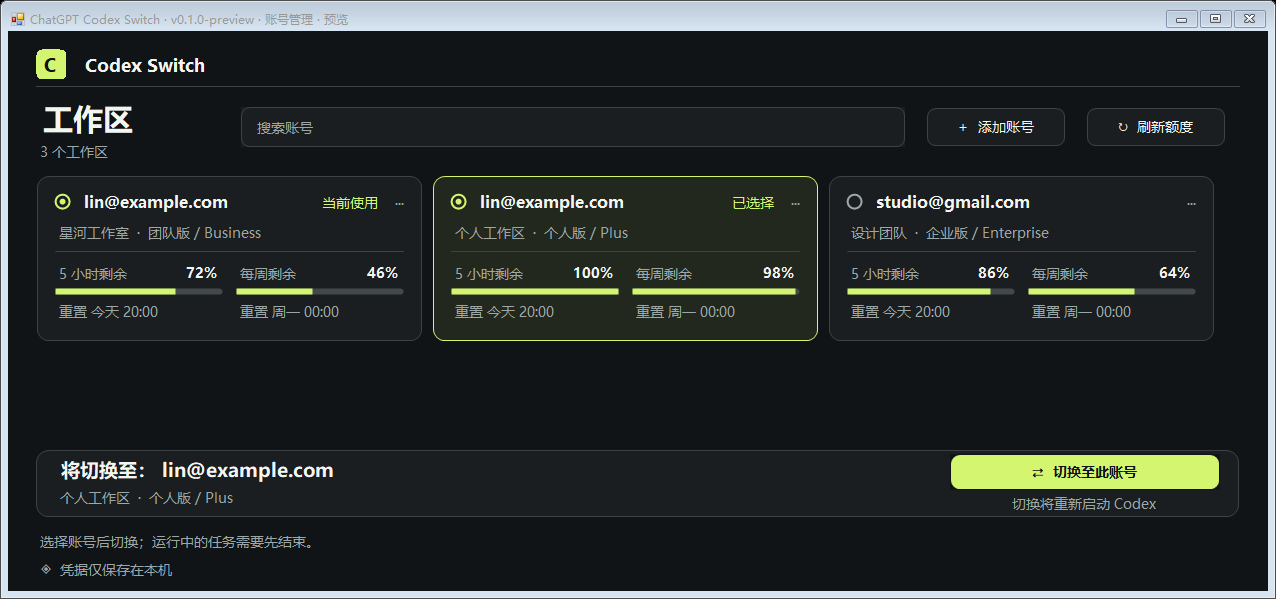
Codex Account Switcher is a community tool for managing Codex desktop sign-ins on Windows. Cards show the account, plan, workspace, and notes. Personal and team workspaces can be identified separately even when they share an email address. Usage limits reflect the data returned by the service.
Example workflow
If you use a team workspace during the day and a personal account later, add recognizable notes to each card. Check the workspace and usage limits before switching. Switching restarts Codex, so save your work and finish any running tasks first.
Getting started
Download the portable Windows ZIP and extract it. Choose Add account and use the sign-in flow provided by Codex. After switching, check the active account in Codex and confirm it in the switcher.
Downloads and project resources
Manage Codex desktop accounts on Windows, switch workspaces, and check usage limits. Windows DPAPI encrypts credentials on your device. Save your current work, as switching accounts restarts Codex.
An independent community tool in public preview. This project is unaffiliated with OpenAI.